Telkom University Email Login Guide
Telkom University provides official email services for students, lecturers, and employees through the platform Microsoft 365. This email serves as the primary communication medium for various academic and administrative needs. To avoid any issues with its use, here is the guide to logging into your Telkom University email:
1. Opening the Microsoft 365 Page
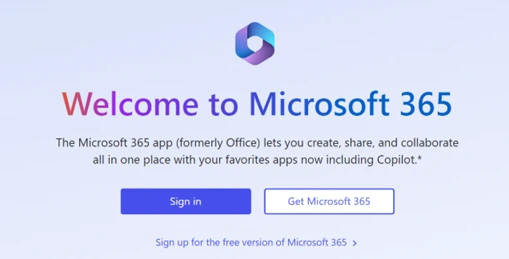
The first step is to open your favorite browser (like Google Chrome, Mozilla Firefox, or Microsoft Edge). After that, visit the official Microsoft 365 website at https://www.office.com/
2. Choosing Sign In Options
On the Microsoft 365 homepage, you will see several options. To log in using your Telkom University account, click the button Sign In. This button is usually in the middle of the page and is blue.
3. Logging in to Telkom University SSO Account
Next, enter the account Single Sign On (SSO) in accordance with your status at Telkom University:
- For Students: use an email address with the format username@student.telkomuniversity.ac.id.
- For Lecturers or Staff: use an email address with the format username@telkomuniversity.ac.id.
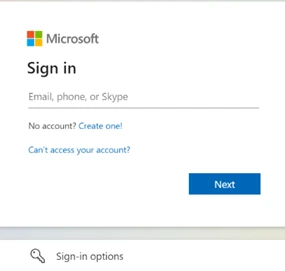
Ensure you type your email address correctly so the system can recognize your account. Once finished, click Next to continue.
4. Filling in the SSO Account Password
After entering the email address, the system will ask you to fill in Password SSO. This password is the same as the one used to access various official Telkom University services. Type the password carefully, then click Sign In.
5. Accessing the Office Portal and Email
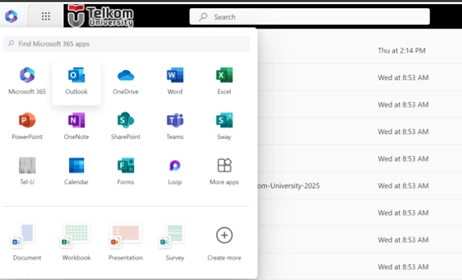
If login is successful, you will be directed to the main Office Portal page. On this page, various applications are available such as Word, Excel, PowerPoint, OneDrive, and Teams. To open email, simply click the icon All Apps, then choose the app Outlook as the main way to access Telkom University email.
If there are any issues, please contact us at WhatsApp follows 0813-1980-0200 and email dtijkt@telkomuniversity.ac.id
Hello Harmony, Excellence, Integrity
Information Technology Support